On any book page, select Recommend, then Recommend to a friend. Add a note if you like, then select Recommend next to the person you want to send it to. You can send to people you follow and people in your clubs, or send it by email or text to anyone else.
Send a recommendation
- Open the book's page and select Recommend (next to Add to my shelves).
- Select Recommend to a friend.
- Optional: add a note in the Note box (up to 200 characters).
- Find your friend under Friends or Clubmates & readers you follow, or use Search readers.
- Select Recommend next to their name. The button changes to Sent!
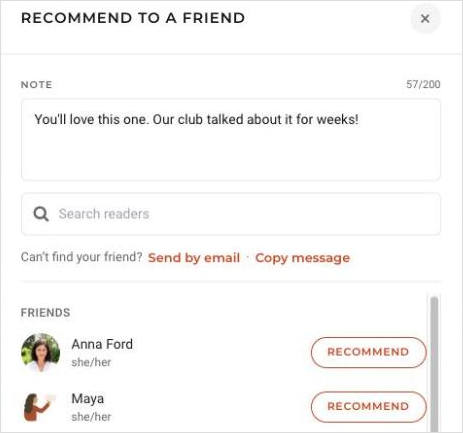
Send to a friend who isn't on Bookclubs
Under Can't find your friend?:
- Website: select Send by email and enter their email address, or select Copy message and paste it into a text or message.
- App: tap Send by text to send it from your phone, or Send by email.
When your friend joins Bookclubs from your recommendation, the book is added to their Want to Read shelf and you become friends on Bookclubs, so you can see each other's shelves.
If you email a recommendation to someone who already has a Bookclubs account, it goes to their account.
When someone recommends a book to you
You'll get a notification that says who recommended the book. Select See the recommendation to read their note, then Add to Want to Read to save the book.
To turn recommendation emails or notifications off, go to Email and Notification Settings (in the app, More > Account > Email and Notification Settings) and find Book recommendations.
Troubleshooting
- My friend isn't in the list. The list includes people you follow (once they've accepted) and people in your clubs. For anyone else, use Send by email, Send by text or Copy message.
- "You can send up to 20 email recommendations a day." You can email up to 20 recommendations in a 24-hour period. Try again tomorrow, or send by text or copied message, which doesn't count toward the limit.
Was this article helpful?
That’s Great!
Thank you for your feedback
Sorry! We couldn't be helpful
Thank you for your feedback
Feedback sent
We appreciate your effort and will try to fix the article