Open a reader's profile and select Follow. If they let anyone follow them, you'll see their shelves right away. If they approve their followers, the button says Requested until they accept. When you follow each other, the button says Friends.
Find readers to follow
- People from your clubs: on the website, go to My Friends. In the app, tap the My Friends tab. You'll see People from your clubs, and you can use the Search people in your clubs box to find someone by name.
- Your club's member list: open your club's Members page and select a member's name.
- A shared link: if a friend sends you their profile link, open it and follow them from there.
Search covers people in your clubs. To follow a friend who isn't in any of your clubs, ask them to send you their profile link with Share my profile.
Follow someone
- Open the reader's profile.
- Select Follow. If they already follow you, the button says Follow back.
- The button changes to Following, or to Requested if they approve their followers. You'll get a notification and an email when they accept.
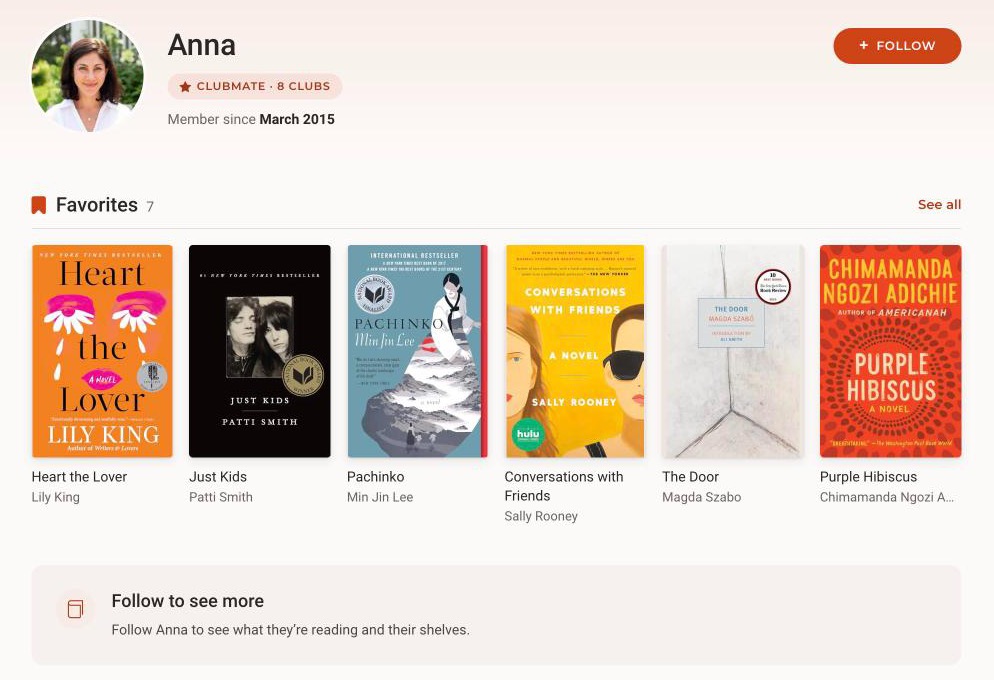
Until they accept, you'll see their first name, when they joined Bookclubs, and their Favorites. Once they accept, you'll see their full name, their shelves (Currently Reading, Want to Read, Have Read and Did Not Finish), their reading stats and their clubs.
Unfollow someone
- Open their profile.
- Select Following (or Friends).
- Select Unfollow to confirm.
They aren't notified. To see their full profile again, follow them again. If they approve their followers, they'll need to accept your new request.
Troubleshooting
- "Request not accepted" or "Can't send a follow request." This reader didn't accept an earlier follow request from you, so you can't send a new one. You can still see their Favorites.
- The button still says Requested. The reader hasn't responded yet. There's nothing else you need to do. You'll be notified if they accept.
- I can't find someone in search. Search currently only includes people who are in a club with you. Ask them for their profile link instead.
Was this article helpful?
That’s Great!
Thank you for your feedback
Sorry! We couldn't be helpful
Thank you for your feedback
Feedback sent
We appreciate your effort and will try to fix the article